

Google has released Android 17 QPR2 Beta 3 for eligible Pixel devices, bringing another round of improvements to the Android 17 testing program. The update was released on August 14, 2026, and carries the August 2026 security patch. Google lists builds CP41.260731.005.A2 and CP41.260731.005.B1, depending on the device.
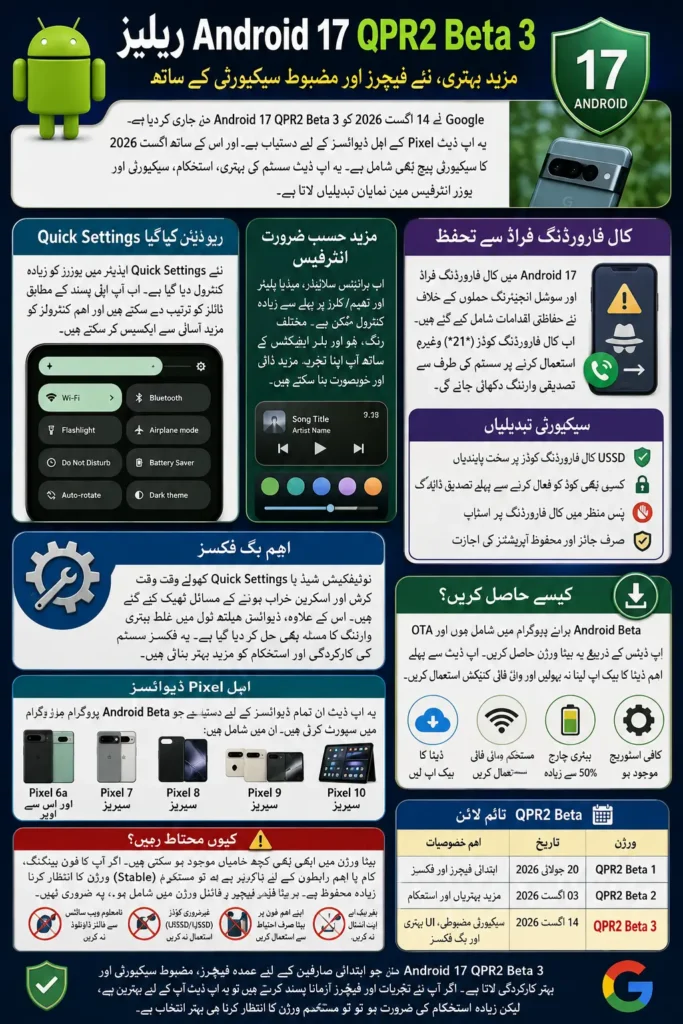
Unlike a major Android version upgrade, QPR2 Beta 3 is primarily focused on refinements, stability, security and user-interface improvements. However, this release is attracting attention because it expands customization possibilities and adds an important protection against call-forwarding fraud.
Android 17 QPR2 Beta 3: What’s New?
Android 17 QPR2 Beta 3 combines system fixes with changes that can affect the everyday Pixel experience. Google describes QPR updates as quarterly releases that bring improvements to Pixel devices and the Android platform without introducing major app-impacting behavior changes.
Some of the most important areas to know about include:
- Redesigned Quick Settings customization
- More control over the layout of system controls
- Additional interface customization options
- Improved protection against call-forwarding scams
- Fixes for Quick Settings and notification-shade crashes
- August 2026 security updates
The exact appearance and availability of some interface features can vary during beta testing, so users should not assume that every experimental option will necessarily remain unchanged in the final release.
You can also read: CM Punjab Rehmat Card 2026 Online
Redesigned Quick Settings Editor
One of the most noticeable changes in the Android 17 QPR2 beta cycle is the redesigned Quick Settings editor. Quick Settings is the panel users open to access controls such as Wi-Fi, Bluetooth, Airplane mode, flashlight and other frequently used functions.
The updated approach gives users more flexibility over how these controls are arranged. Instead of simply accepting a fixed layout, users can organize tiles around the controls they use most often, making the panel more practical for everyday use.
More Flexible Quick Settings Tiles
The customization goes beyond simply moving icons. Users can have more control over the size and presentation of supported Quick Settings tiles, allowing important controls to receive greater visual prominence.
This is particularly useful for people who frequently use certain system functions. For example, someone who regularly switches between connectivity options could place those controls in easier-to-reach positions instead of scrolling through a less relevant collection of tiles.
Brightness Slider and Media Player Customization
Android 17 QPR2 also continues Google’s broader effort to make the system interface more customizable. Reports around the beta indicate that Google is experimenting with greater control over the positioning of elements such as the brightness slider and media player.
These changes may appear small, but they can make the interface feel more personal. The brightness control is one of the most frequently used elements in Quick Settings, while the media player becomes particularly important for people who regularly listen to music or podcasts.
More Theming and Blur Effects
Android 17’s interface is also moving toward greater visual customization. Additional options have been seen during Android 17 testing, including more control over colors, hues and blur effects.
However, beta features should be treated carefully. A feature visible in one testing build is not automatically a promise that the same design will ship unchanged in the stable version.
Android 17 Adds Protection Against Call-Forwarding Fraud
Security is arguably the most important practical change in QPR2 Beta 3. Google says the update introduces new restrictions designed to protect users from call-forwarding fraud and social-engineering attacks.
Fraudsters can sometimes persuade victims to enter call-forwarding codes into their phones. If successful, incoming calls can be redirected to another number, potentially allowing attackers to intercept calls that may contain verification codes or other sensitive information.
You can also read: Prize Bond Rs1500 Draw Scheduled
How the New Call-Forwarding Protection Works
Android 17 QPR2 Beta 3 adds restrictions around programmatic call forwarding and introduces an operating-system confirmation step when users manually enter relevant call-forwarding codes in the system dialer.
Google specifically notes that call-forwarding USSD codes, including examples such as *21*, are handled differently under the new security model. Standard apps can no longer use the relevant API with only the CALL_PHONE permission to perform these call-forwarding operations in the background.
| Security change | What it means |
|---|---|
| Call-forwarding USSD restrictions | Apps face stronger limitations when attempting programmatic call forwarding |
| Confirmation dialog | Users can receive an OS-level warning before manually executing certain forwarding commands |
| Background protection | Standard apps cannot silently perform restricted call-forwarding operations |
| Other USSD services | Non-call-forwarding USSD requests are not affected by this particular restriction |
| Developer impact | Affected apps need to handle blocked USSD requests correctly |
The important point for ordinary users is simple: do not enter call-forwarding codes because someone on a phone call or message tells you to do so without first verifying the request.
Important Bug Fixes in QPR2 Beta 3
Beta 3 is not only about new features. Google has also addressed several problems reported during earlier Android 17 QPR2 testing.
One notable fix addresses a problem where opening the notification shade or Quick Settings could cause visual corruption and, in some situations, an unexpected device restart. Google also fixed false battery-capacity degradation warnings shown by the Device Health and Support tool.
These fixes are especially important because beta software can expose unusual system behavior that would not normally be expected on a stable Android release.
Android 17 QPR2 Beta 3 Supported Pixel Devices
Google’s Android 17 QPR2 documentation lists a broad range of Pixel hardware for the beta program. The available devices include newer Pixel models as well as several older supported phones.
The supported lineup includes:
- Pixel 6a
- Pixel 7, 7 Pro and 7a
- Pixel Fold
- Pixel Tablet
- Pixel 8, 8 Pro and 8a
- Pixel 9, 9 Pro, 9 Pro XL, 9 Pro Fold and 9a
- Pixel 10, 10 Pro, 10 Pro XL, 10 Pro Fold and 10a
Availability can depend on the specific beta build and Google’s rollout process, so users should check the official Android Beta program rather than relying on unofficial download sources.
You can also read: Nadra QR Code Identity Cards
How to Get Android 17 QPR2 Beta 3
Eligible Pixel owners can join the Android Beta for Pixel program and receive beta releases through over-the-air updates. Google says that once a supported device is enrolled, it can receive continuing beta updates during the platform’s release cycle.
Before installing a beta build, it is important to understand that beta software can contain bugs. Google recommends backing up important information before enrolling, even though moving to QPR2 Beta generally does not require a full reset in most cases.
Best Practices Before Installing
A few precautions can prevent unnecessary problems:
- Back up photos, contacts and important documents.
- Make sure the phone has sufficient battery and storage.
- Install the update over a reliable Wi-Fi connection.
- Avoid using a beta phone as your only device for critical work.
- Read Google’s known-issues information before installing.
- Do not flash system images unless you understand the risks.
Manual flashing deserves extra caution because moving between production and beta builds through certain flashing methods can require a complete data wipe. Google specifically warns users to back up their Pixel before flashing.
Should You Install Android 17 QPR2 Beta 3?
For developers, Android enthusiasts and users who enjoy testing new Pixel features, QPR2 Beta 3 can be an interesting update. The combination of interface customization, security improvements and bug fixes makes this release more than a routine background update.
For users who depend on their phone for banking, work, communication or other important tasks, waiting for a stable release is generally the safer choice. Beta software can still contain unexpected compatibility, performance or stability problems even when a build is relatively mature.
Common Mistakes to Avoid With Android Beta Updates
Installing a beta simply because it contains new features can sometimes create unnecessary problems. The most common mistake is treating a beta build as though it were a finished public release.
Keep these points in mind:
- Do not install beta software on a critical work device unless necessary.
- Do not assume every experimental feature will reach the stable release.
- Do not download Android beta files from unknown websites.
- Do not ignore Google’s listed known issues.
- Do not enter unfamiliar USSD or call-forwarding codes because someone asks you to.
- Always keep a current backup before major system changes.
Following these precautions makes testing a new Android release considerably safer.
Android 17 QPR2 Beta 3 vs Earlier QPR2 Builds
QPR2 Beta 1 arrived in July 2026, followed by Beta 2 in early August and Beta 3 on August 14. Google’s official release notes show that Beta 3 carries the August 2026 security patch and Google Play services version 26.26.34.
The progression shows that Google is moving through incremental testing rather than introducing another major Android redesign in every beta. The focus is increasingly on polishing the experience, fixing issues and validating new system behavior before the eventual stable release.
| Version | Release date | Main focus |
| QPR2 Beta 1 | July 20, 2026 | Initial QPR2 features and fixes |
| QPR2 Beta 2 | August 3, 2026 | Continued testing and refinements |
| QPR2 Beta 3 | August 14, 2026 | Security hardening, UI refinements and bug fixes |
What to Expect Next From Android 17
Android 17 QPR2 Beta 3 is still part of Google’s testing cycle, meaning additional changes can arrive before the final QPR2 release. Google’s documentation describes QPR releases as quarterly updates delivered to supported Pixel devices as part of Feature Drops.
The biggest areas to watch are further interface customization, Quick Settings refinements, security improvements and stability. Some experimental design elements may also be adjusted or removed based on testing and feedback, so the beta should be viewed as a work in progress rather than a final specification.
You can also read: Google Pixel 11 Pro Price in Pakistan 2026
Conclusion
The Android 17 QPR2 Beta 3 update is a meaningful step forward for Pixel users who want a more customizable and secure Android experience. The redesigned Quick Settings approach and additional interface controls can make everyday interaction more flexible, while the new call-forwarding safeguards address a real fraud technique that can be exploited through social engineering.
The update was officially released on August 14, 2026, with the August security patch and several important bug fixes. For enthusiasts and developers, it is worth exploring, but everyday users who prioritize maximum stability should consider waiting for the stable release rather than installing beta software solely for early access to new features.
Official Android 17 QPR2 resources: Android 17 QPR2 release notes and Android 17 QPR2 overview